Automatic Recertification: How to Keep Compliance Training Renewals on Schedule



Compliance training renewal cycles range from monthly to every seven years. See how EasyLlama's Automatic Recertification keeps recurring training on schedule.
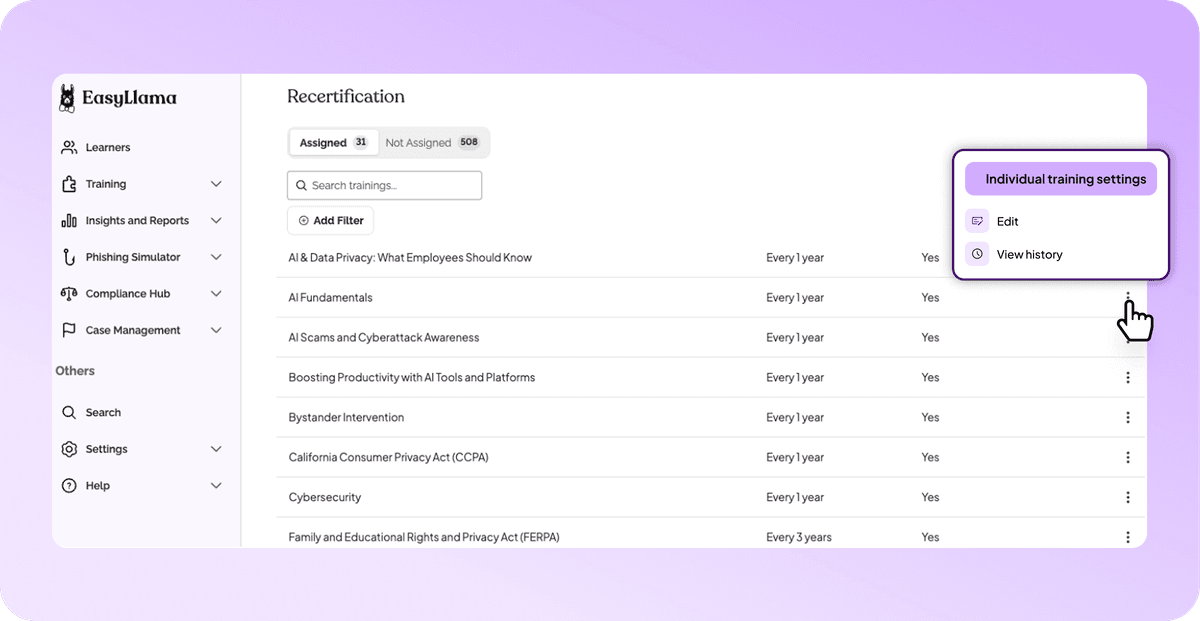
Learn why compliance training recertification can be difficult to manage and how EasyLlama simplifies recurring training with automated assignments, flexible frequencies, and greater visibility into learner activity.
Test Your Compliance
Find out if your company is compliant in two minutes with our free Compliance Grader.
Get Your Free ReportAsk an HR leader how often their team needs to retake compliance training, and you'll probably get one of two answers: "it depends" or "let me Google it real quick."
And the truth is, it really does depend. Recertification requirements vary by state, course type, employee role, and even whether someone was on leave when their renewal came due.
Compliance training in the United States can be complex and, for some, overwhelming. When our team at EasyLlama analyzed 814 compliance training requirements across the country, we found recertification cycles as short as one month and as long as seven years. Some requirements come back every year, while others only need to be completed once. A few even have to be completed before an employee can apply for a job.
For an HR team, whether you're a team of one or a team of 100, that's a lot to navigate.
And for organizations still tracking all of this manually, it often means maintaining spreadsheets of completion dates, calendar reminders, and running lists of who's due next month. That might work for a while, but what happens when someone goes on leave, changes roles, or a new course gets added to the mix?
This blog covers why recertification gets complicated so quickly and how EasyLlama's Automatic Recertification helps keep recurring training on schedule without anyone having to chase a calendar.
Why compliance training recertification is so hard to track
Compliance is complex on its own. Recertification adds another layer: not just what training each person needs, but when they need it again. And when you're managing multiple requirements across different states, departments, and employee populations, those dates can add up quickly.
Renewal cycles range from monthly to every seven years
Across the 814 requirements EasyLlama analyzed, the shortest recertification cycle is monthly, meaning training needs to be renewed every single month. The longest is once every seven years. Between those two extremes sits everything else, and most organizations deal with several cycles at the same time.
Annual renewals are among the most familiar. New York State, for example, requires that every employee receive sexual harassment prevention training annually. For a multi-state employer, that annual cycle sits right next to courses on entirely different schedules, each with its own timeline for every employee.
Nearly half of requirements are one-time only
Not everything renews. Of the 814 requirements we analyzed, 386 are one-time only. That means the other 428 involve some form of recurring training.
Knowing the difference between what requires recertification and what only needs to be completed once saves both you and your employees significant time. Reassign a one-time course unnecessarily, and you've created extra work for everyone. Miss a recurring requirement, and now you have a potential compliance risk. Knowing which category each course falls into, for each employee, is half the work.
Some deadlines start before day one
Then there are requirements with no runway at all. The Kansas CDL Human Trafficking Identification & Prevention Training, for example, must be completed before a driver can even apply for a commercial driver's license. According to the Kansas Attorney General's office, applicants must present a printed certificate of completion when they apply.
While this isn't a recurring training requirement, it illustrates just how different compliance training deadlines can be from one requirement or state to the next.
People don't stand still
Even with every cycle mapped out, your workforce keeps moving. Employees can go on leave, relocate to a new state, or get promoted into a supervisor role that carries different training requirements.
Every one of those changes can affect what training a person needs and when it's due. Tracking that manually means updating dates by hand every time something changes and hoping nothing slips through. That's a lot to keep up with, especially as your organization grows.
What EasyLlama's Automatic Recertification Does
EasyLlama's Automatic Recertification takes the manual work out of managing recurring compliance training by tracking when learners need to retake a course and automatically assigning it when the time comes. Instead of maintaining spreadsheets or setting calendar reminders for every employee, Admins can configure a recertification frequency for each training and let EasyLlama handle the schedule.
When Auto-Assign is enabled, EasyLlama tracks each learner's recertification schedule based on their most recent completion date and the frequency configured for that training. Recurring training is automatically assigned 30 days before the existing certification expires, giving learners time to complete it before their current certification lapses. Once they finish, their next recertification cycle begins based on the new completion date.
And because Automatic Recertification is part of EasyLlama's broader Workflow Automations capabilities, it works alongside learner notifications and other automated training processes to reduce the administrative work that comes with managing compliance.
Frequency vs. Automatic Recertification
These two settings work together, but they control different things:
- Frequency sets when learners need to recertify: every year, every two or three years, a custom time frame, or never.
-** Auto-Assign** determines whether EasyLlama automatically assigns the recurring training or an Admin handles the assignment manually.
You can mix and match. A training can have a one-year frequency with Auto-Assign enabled, or that same one-year frequency with Auto-Assign turned off. When Auto-Assign is disabled, EasyLlama still tracks upcoming recertifications, but an Admin is responsible for assigning the training when learners are due.
That flexibility is useful for monthly, annual, or multi-year requirements alike. The frequency matches the requirement, and Auto-Assign handles the timing when you want it to.
How to set up Automatic Recertification in EasyLlama
Here's how I recommend approaching setup. You'll need Admin access to your EasyLlama dashboard, but the process itself is straightforward.
1. Set the frequency for each training
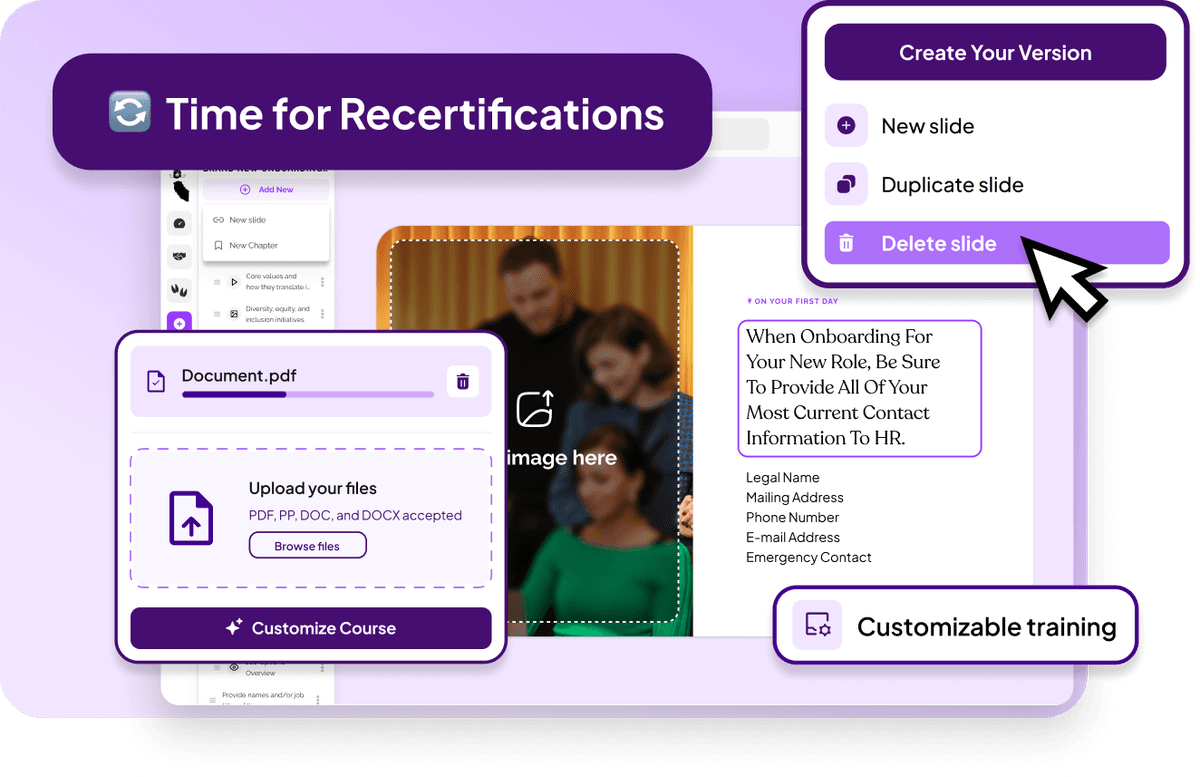
Go to Settings > Recertification to view and manage your organization's recurring training.
From the Assigned view, find the training you want to manage, click the three-dot menu, and select Edit. From there, you can configure how often learners need to recertify, whether that's annually, every two or three years, or at a custom interval.
For training that doesn't need to be repeated, select Never.
2. Confirm Auto-Assign is enabled
From the same Recertification Settings, you can turn Auto-Assign on or off for an individual training. If you'd rather manage multiple trainings at once, you can also use the Auto-Assign header toggle to make changes in bulk.
With Auto-Assign enabled, EasyLlama automatically generates recurring assignments 30 days before each learner's existing certification expires.
If you prefer to handle a particular training manually, you can turn Auto-Assign off without removing the recertification requirement. EasyLlama will continue tracking when learners are due, and Admins can assign recurring training individually or in bulk.
3. Review upcoming recertifications
Once you've configured your training settings, you can monitor upcoming recertifications directly from the Learners page.
The** Due for recertification** filter helps you identify learners who need recurring training, while each learner's profile provides a more detailed view of their upcoming recertifications, including the scheduled date, frequency, and Auto-Assign status.
You can also edit, cancel, or manually assign an upcoming recertification directly from the learner's profile.
4. Turn on the weekly Admin summary
Admins can receive a weekly email with information about learners scheduled for recertification the following week. To enable it:
- Go to Settings > My Notifications.
- Enable Learners are up for recertification.
- Click Save.
It's a simple way to stay informed about what's coming without having to log in and check individual training schedules.
5. Check which course types support recertification
Standard EasyLlama courses and customized courses support recertification. Courses assigned through Classrooms, SCORM files, and courses created with the AI Course Authoring Tool don't currently generate recertification dates, so they can't be managed through Automatic Recertification.
For training that needs to renew automatically, make sure you're using a supported course type.
How Automatic Recertification handles real-life changes
This is the part that's hardest to manage by hand, and where automation can make a meaningful difference. Employees take leave, return to work, change roles, and move between locations. Your training program needs to account for those changes without creating more administrative work.
Here's how EasyLlama handles some of the most common scenarios:
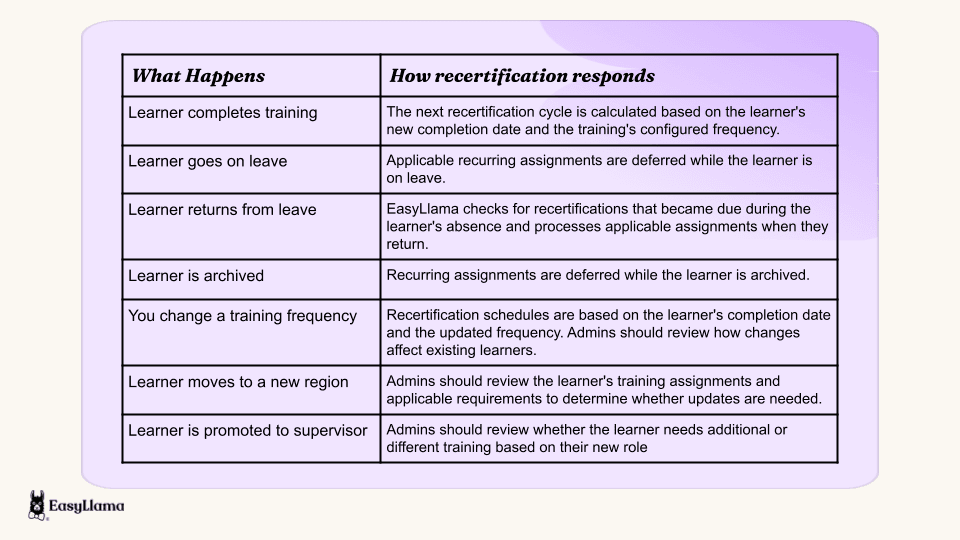
And with EasyLlama's enhanced Recertifications experience, Admins have more visibility into these changes than ever before.
Recertification History provides a record of updates to an individual training's frequency and Auto-Assign settings, including who made each change and when. Meanwhile, the enhanced learner profile brings current assignments, upcoming recertifications, and completed training together in one place.
Admins can also review an individual assignment's Activity Log to see when training was assigned, what actions were taken, and when it was completed. It's a much clearer picture of the learner's training history without having to piece everything together manually.
One system, whether you have 5 employees or 5,000
The complexity of compliance training doesn't scale down for small teams. A 5-person company and a 5,000-person company can face the same mix of monthly, annual, multi-year, and one-time requirements. The difference is how many dates there are to track.
For a small team, Automatic Recertification means the one person wearing the HR hat doesn't have to maintain a separate renewal calendar or remember when to reassign training. For a larger organization, it means thousands of individual recertification schedules can be managed consistently, each tied to the learner's completion history and the frequency configured for that training.
And now, with greater visibility into upcoming recertifications, assignment activity, and changes to recertification settings, Admins can spend less time tracking down information and more time focusing on the things that actually need their attention.
The setup is the same either way: configure the right frequency, enable Auto-Assign, and let EasyLlama handle the timing. Learners receive their recurring assignments and notifications, while Admins have the tools to monitor what's coming and step in when needed.
See how EasyLlama simplifies compliance. Get a Demo to see Automatic Recertification in action.
Share this


Frequently
Asked
Questions

- Automatic recertification is when a training platform automatically reassigns required training based on a defined renewal schedule. In EasyLlama, Auto-Assign generates recurring assignments 30 days before a learner's existing certification expires, based on their completion date and the training's configured frequency.
- It depends on the requirement. In EasyLlama's analysis of 814 U.S. compliance training requirements, recertification cycles ranged from monthly to every seven years, and 386 of those requirements were one-time only.
- Auto-Assign is available for supported recurring training and can be enabled or disabled at the individual training level. Admins can also update Auto-Assign across multiple trainings using the bulk toggle under Settings > Recertification.
- Yes. Recertification frequency is configured at the individual training level, so one training can recur annually while another follows a two-year, three-year, or custom schedule.
- Applicable recurring assignments are deferred while the learner is on leave. When they return, EasyLlama checks for recertifications that became due during their absence and processes applicable assignments based on their recertification settings.
- Standard EasyLlama courses and customized courses support recertification. Classroom assignments, SCORM files, and courses created with the AI Course Authoring Tool don't currently support Automatic Recertification.
 Articles
Read More Blogs
Explore what others in your field are learning

EasyLlama vs Ethena: Which Platform Is Best For You?
Explore Ethena vs. EasyLlama: Uncover the ultimate compliance training solution. Compare features, pricing & benefits. Make an informed choice today!
Alicia Falcon

Build a Compliance Program You Can Trust: Introducing EasyLlama Compliance Advisor
Meet Compliance Advisor: A smarter way to know exactly which training your organization is legally required to provide — and turn that into a program you can trust.

Samuel Devyver

How HR Teams Build Agile Compliance Programs That Adapt and Scale
Learn about Agile Compliance, the modern compliance training approach that evolves and changes over time. Understand why traditional compliance programs are no longer sufficient.

Sarah Hamilton
Start Modernizing Workplace Compliance
It’s easy to get started with EasyLlama. Speak with one of our compliance experts and get a demo tailored to your business’s needs.
