How to Build Custom HR Compliance Reports in Your LMS



Learn how to build a custom HR compliance report that tracks training completions, policy acknowledgments, and certificate status — all in one audit-ready view.

Learn how to build a custom HR compliance report that tracks training completions, policy acknowledgments, and certificate status — all in one audit-ready view.
Test Your Compliance
Find out if your company is compliant in two minutes with our free Compliance Grader.
Get Your Free ReportWhen an auditor asks you to prove that every employee in your California office completed the latest harassment prevention training on time, a spreadsheet pulled from three different systems is not going to cut it. A compliance report is not a dashboard snapshot or a summary chart. It is a defensible, timestamped record that proves employees completed required training, acknowledged policies, and hold valid certificates.
Building a custom compliance report inside your LMS gives you a single, real-time view of who is compliant and who is not, so you can fix gaps before they become audit findings.
HR teams that move compliance reporting into a purpose-built LMS eliminate manual data merges, close gaps faster, and produce audit-ready records on demand without IT help. This guide shows you how, from choosing the right data fields, to scheduling automated delivery.
What belongs in a training compliance report
A useful compliance report goes beyond surface-level metrics. Before you open a report builder, you need to understand what makes a compliance report defensible and how it differs from the dashboards most LMS platforms default to.
The difference between a dashboard and a compliance report
A dashboard shows real-time activity. It tells you what is happening right now: who logged in today, which courses are in progress, and how many completions came in this week. That is helpful for day-to-day monitoring, but it is not what an auditor wants to see.
A compliance report is a timestamped, exportable record designed to answer one question: can you prove every employee completed the right training, on time, with documentation to back it up? That is exactly what a compliance audit is designed to verify.
The distinction matters because different stakeholders rely on these reports for different reasons:
- HR managers need to spot gaps and assign remediation
- Compliance officers need to verify that regulatory requirements are met across locations
- Department leaders need their team's completion status
- Auditors and legal counsel need dated, exportable evidence they can review independently.
A single dashboard view cannot serve all of those needs, but a well-built compliance report can.
Essential data fields
A training compliance report should capture the specific data fields that auditors and regulators expect to see. These include:
- Employee name and ID
- Assigned training or policy
- Completion status
- Due date and completion date
- Passing score
- Certificate status and expiration date
- Acknowledgment date
- Version history with timestamps
It should also capture organizational data so you can filter by manager, department, or location.
Each field serves a purpose. Timestamps prove when an action occurred, not just that it happened. Version history confirms the employee completed the current version of a policy, not an outdated one.
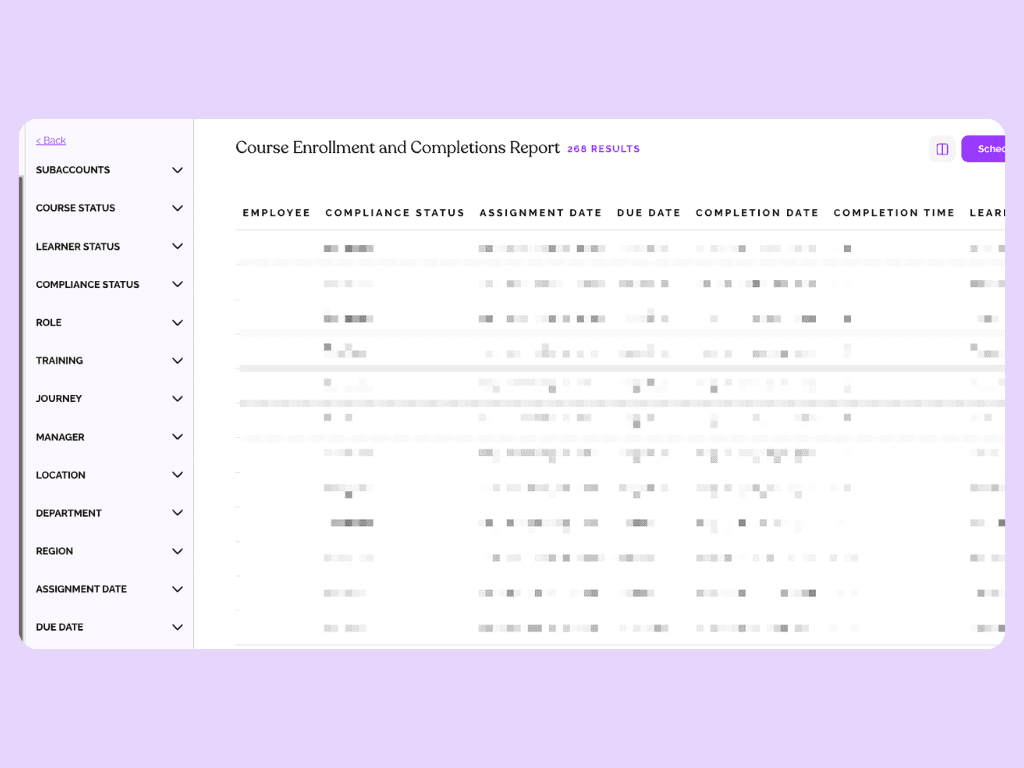
Certificate expiration flags upcoming gaps before they open the organization to risk. Manager and location data let you filter by team or site, which matters for organizations operating across multiple states or jurisdictions with different training requirements.
Most generic LMS reports leave out critical fields like acknowledgment dates, certificate expiration, and version history. These are exactly the fields auditors ask for. If your LMS cannot produce them in a single report, you end up manually merging spreadsheets from separate systems — a time-consuming process that introduces errors.
How to build a custom compliance report
EasyLlama's Custom Report Builder lets you create compliance reports from a single admin dashboard without spreadsheets, IT requests, or manual data pulls. The following walkthrough covers each step from setup to automation.
Step 1: Open the Custom Report Builder
From EasyLlama's admin dashboard, navigate to the Custom Report Builder. This is where you define the metrics, filters, and layout for your compliance report.
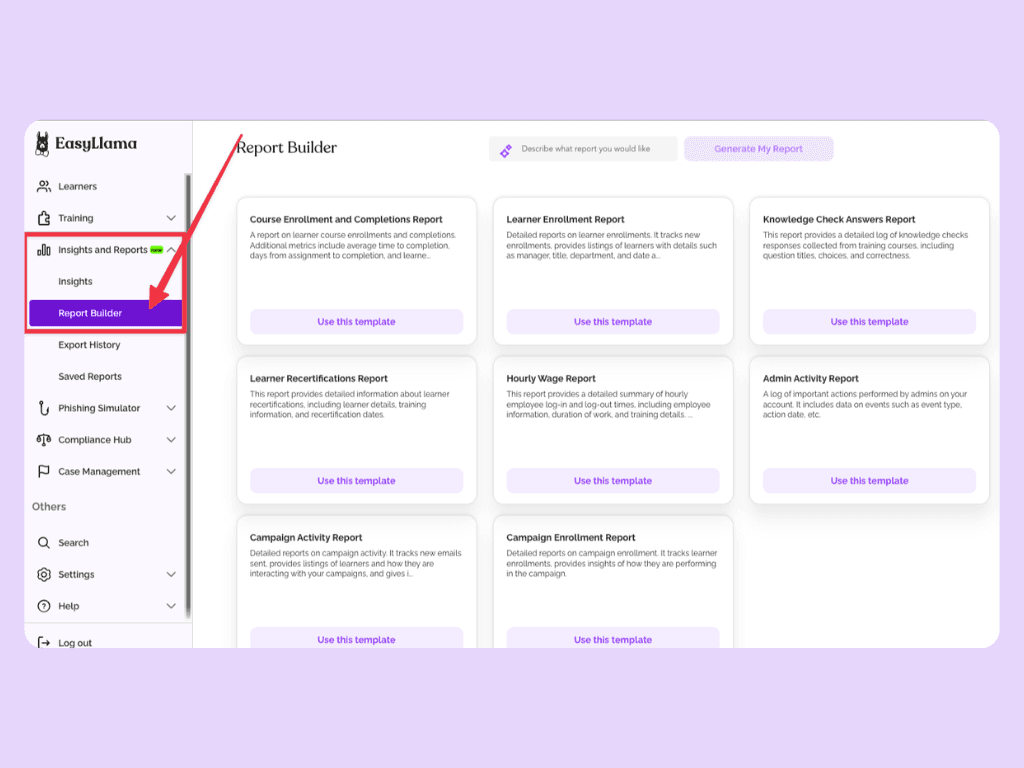
The immediate benefit is independence from IT. Admins can create custom dashboards and views directly, which means faster report creation and earlier visibility into compliance gaps.
Step 2: Select your compliance metrics
Start by choosing the metrics your report needs to answer a specific compliance question. Key metrics to consider include completion rates, overdue assignments, passing scores, certificate status, acknowledgment records, and due-date adherence.
The right combination depends on the question you need to answer. If you need to know which employees in the California office have not completed updated harassment prevention training, select: location, course, and completion status as your primary metrics. If you are preparing for a company-wide audit, you might pull completion rates and certificate status across all required courses.
Because EasyLlama uses real-time completion tracking, you are building a report from live data, which matters when you need to act on the results immediately. For a deeper look at the metrics that matter most, see our guide to LMS reporting and analytics.
Step 3: Apply segmentation filters
Segmentation turns a broad compliance snapshot into a targeted, actionable report. As mentioned above, you can filter by department, location, role, manager, course, or custom fields to produce exactly the view you need.
Multi-location organizations need to see the compliance status by site because training requirements often vary by state or jurisdiction. Department leaders need their own team's status without wading through company-wide data, while auditors frequently request records filtered by a specific regulation or training type.
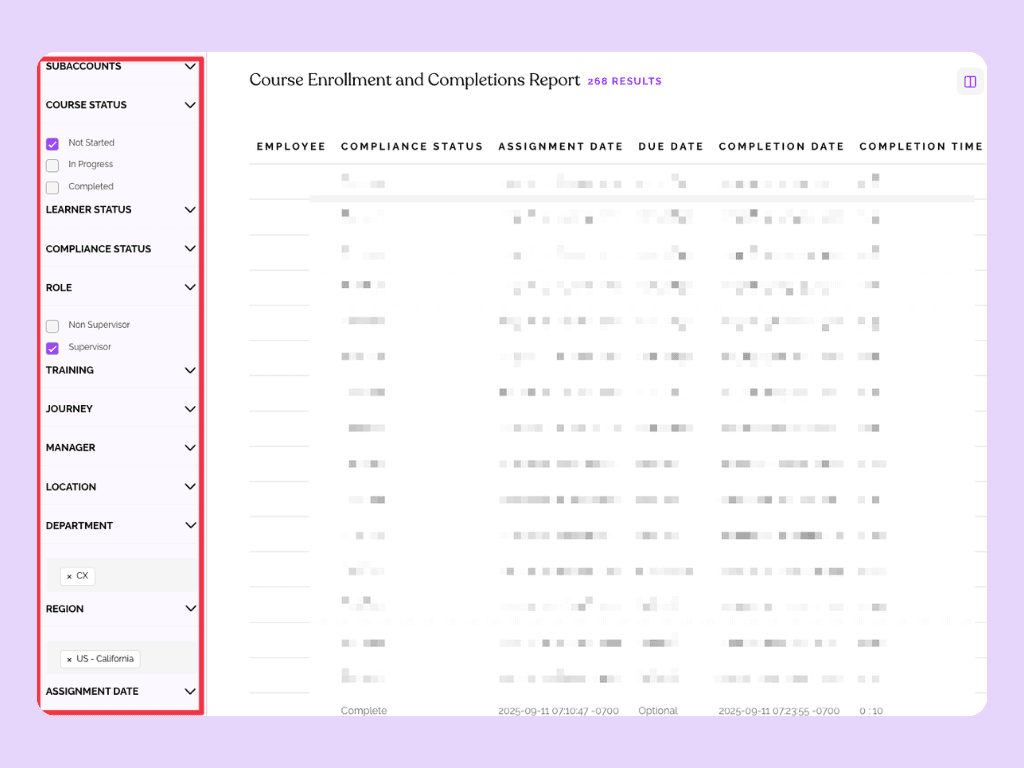
EasyLlama's unified dashboard consolidates training completion, policy acknowledgment, and certificate data in one place. Instead of pulling from three separate systems to build one report, you apply your filters once and the dashboard reflects all relevant data together.
Step 4: Customize the dashboard view
Once your metrics and filters are set, arrange the report layout to match how stakeholders will use it. Consider summary views for quick status checks, detailed employee-level views for remediation, and trend visualizations for tracking progress over time.
EasyLlama's Insights Dashboard provides detailed learner views that show exactly where an employee is in a course. Individuals flagged as Past Due are immediately visible, which makes the cause of non-compliance specific rather than buried in an aggregate number.
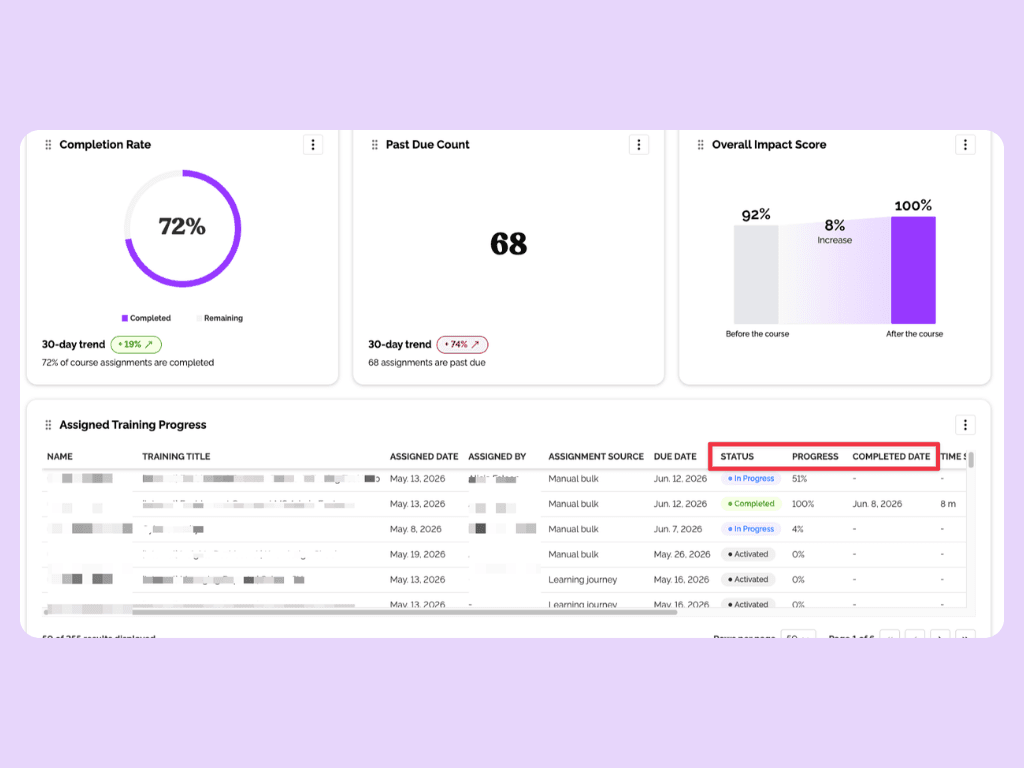
The practical benefit is faster remediation. Managers can identify the right employee, see the exact training status, and determine the next action without digging through additional screens.
Step 5: Save as a reusable template
After building a report configuration that works, save it as a template. Templates can be reused for recurring reporting cycles, such as monthly compliance reviews, quarterly audits, or annual recertification checks.
Saving templates eliminates the need to rebuild reports from scratch each cycle. Instead of re-selecting metrics and re-applying filters every month, you open a saved template and the report generates with current data.
Over the course of a year, that time savings adds up significantly for HR teams managing compliance across multiple training programs.
Step 6: Schedule automated report delivery
Set up automated delivery so reports generate and distribute to stakeholders on a regular cadence, like weekly, monthly, or aligned to your audit calendar.
Scheduled delivery means compliance leaders, department heads, and HR managers receive current data without having to request it.
When reporting happens automatically, compliance stays visible across the organization. Gaps that might go unnoticed for weeks in a manual process get flagged the moment a scheduled report runs.
Step 7: Use AI to surface insights you did not plan for
EasyLlama's AI-powered Reporting Assistant goes beyond the metrics you select manually. It can surface patterns and compliance gaps that a standard report might miss, such as a department with consistently late completions or a course with an unusually low passing rate.
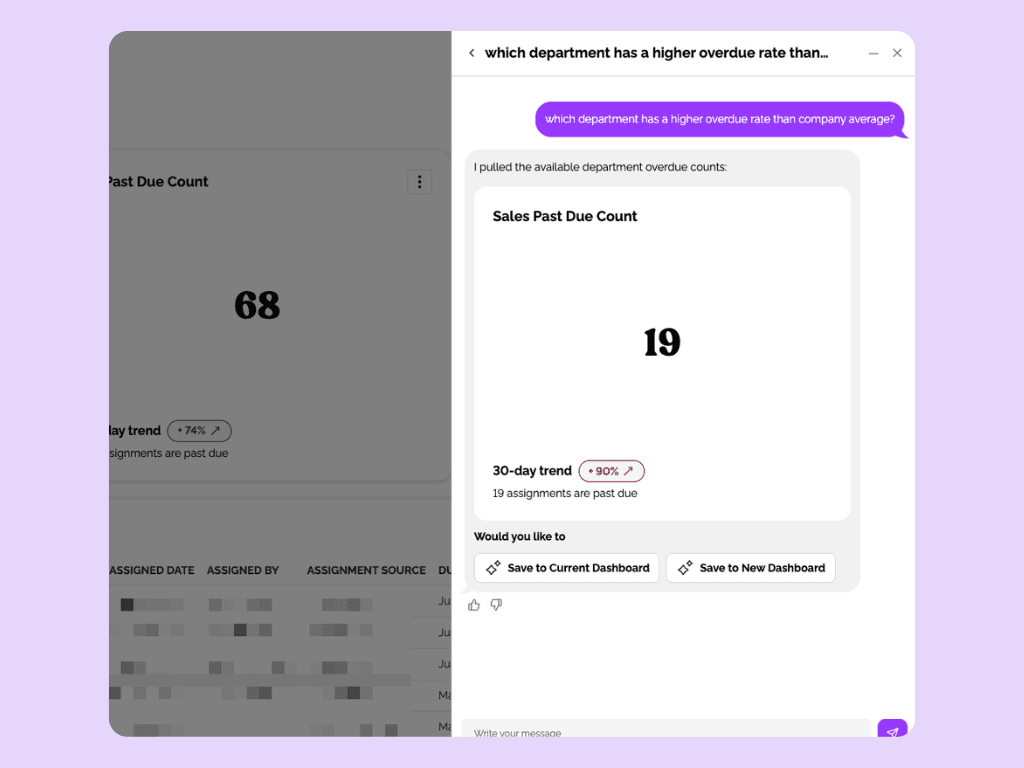
This shifts compliance from reactive to proactive. Instead of waiting for an audit to reveal problems, the system highlights them as they develop. If one team consistently misses deadlines while the rest of the organization stays on track, that signal is worth investigating before it becomes an audit finding.
How to act on compliance report findings
A compliance report is only useful if it drives action. The data needs to connect to remediation workflows and reach the right people in the right format; here is how to turn findings into results.
Identify and remediate non-compliance
Start by using report results to flag non-compliant employees and notify their managers. Set a remediation deadline and track resolution. The goal is to close gaps before they become audit findings as opposed to just being documented after the fact. If you are unsure where to start, our guide to conducting an HR compliance audit walks through the full process.
EasyLlama's automated reminders reduce the follow-up burden on HR by nudging employees directly through channels like email, Slack, and text messages. Instead of manually sending reminder emails to a list of non-compliant employees, the system handles outreach on your behalf. This kind of automation is a proven way to keep completion rates high without adding to HR's workload.
Custom training frequency and due dates also let admins define compliance cadence based on business rules. If your organization requires annual harassment prevention retraining in California and biennial ethics training globally, the system flags non-compliance based on your standards.
Automated recertification cycles can also assign renewals by role and track completions in real time, so retraining logic is applied consistently instead of managed through manual calendar reminders.
Share results with leadership and auditors
Different audiences need different views of the same data. Executive leadership wants a high-level summary that shows where compliance stands overall and flags the areas that need attention. Auditors want detailed, timestamped records for specific employees and training programs. Department managers most likely just want their team's status.
EasyLlama supports bulk certificate export and timestamped documentation, so admins can produce dated evidence on demand during an audit. This includes policy and handbook acknowledgment records, in other words, proof that employees reviewed and signed off on specific documents.
The right LMS integrations with HRIS and payroll systems also keep employee records current automatically. When someone is hired, changes roles, or moves to a new location, the system updates without manual intervention. This way, your compliance reports accurately reflect your current workforce — not a snapshot from the last time someone updated a spreadsheet.
Keep compliance reporting accurate over time
Building a compliance report should be a recurring responsibility that becomes easier when the system handles the tracking for you, but here's a couple of extra tips to help maintain accuracy as your organization grows:
- Run compliance reports at least monthly. Pull additional reports before scheduled audits, after regulatory changes, and during onboarding surges or open enrollment periods. Quarterly trend reviews help leadership see whether compliance is improving or slipping across the organization.
- Assign clear ownership. HR or compliance leads own report creation and distribution. Department managers own remediation. Leadership reviews trends on a quarterly basis.
- Close gaps with new training fast. When a compliance report reveals the need for new or updated training, EasyLlama's Course Authoring Tool lets teams create custom courses in minutes without a vendor or design team. You can convert existing PDFs into interactive lessons or use AI to generate new content, so the gap between identifying a problem and deploying a solution is measured in hours, not weeks.
EasyLlama helps HR teams move compliance reporting from a stressful, manual process to a consistent, automated part of their workflow. When reporting runs on a regular cadence inside a single platform, you spend less time chasing data and more time building a safe, productive workplace.
If you're interested in seeing how EasyLlama can help simplify your compliance reporting needs, book a demo today.
Share this


Frequently
Asked
Questions

- A compliance report includes employee-level data such as training completion status, due dates, completion dates, passing scores, certificate status, policy acknowledgment records, and timestamps. It should also capture organizational data like department, location, and role so that records can be filtered by team or jurisdiction for audits.
- Run compliance reports at least monthly, with additional pulls before audits, after regulatory changes, and during high-volume periods like onboarding surges. Quarterly trend reviews help leadership track whether compliance is improving or declining across the organization.
- Integrate your learning management system with your HRIS so that employee records update automatically when someone is hired, changes roles, or transfers to a new location. EasyLlama connects with BambooHR, Workday, ADP, and many other platforms to keep training assignments and compliance records accurate without manual updates.
- Yes. EasyLlama lets you schedule automated report delivery so that compliance summaries and detailed records reach the right stakeholders on a regular cadence. Scheduled reports ensure compliance data stays visible without requiring HR to manually pull and distribute reports each cycle.
- A non-compliant status means an employee has not met the training or policy acknowledgment requirements within the defined timeframe. A course may be overdue, a certificate may have expired, or a required policy may not have been acknowledged. The specific definition depends on the compliance rules your organization has configured.
- Export timestamped completion records, policy acknowledgment logs, and certificates from your LMS. EasyLlama's bulk certificate export and acknowledgment tracking produce the dated, employee-level evidence auditors need. Having these records available on demand rather than assembled after an audit request significantly reduces preparation time.
 Articles
Read More Blogs
Explore what others in your field are learning

How to Customize Harassment Prevention Training Without Breaking Compliance
Learn how to customize your Harassment Prevention training without breaking compliance. Tailor course to your employees, company policies, and more to maximize knowledge retention and training impact.
Alicia Falcon

How to Automate Compliance Reporting (Without Spreadsheets)
Learn how to automate compliance reporting for your HR team with real-time dashboards, automated alerts, and audit-ready evidence you can pull in minutes.
Alicia Falcon

How to Choose A Customizable Compliance Training Platform: Buyer's Guide
Not all customizable compliance training is created equal—learn how to evaluate platforms on depth, self-serve workflows, and audit-ready reporting.

Sarah Hamilton
Start Modernizing Workplace Compliance
It’s easy to get started with EasyLlama. Speak with one of our compliance experts and get a demo tailored to your business’s needs.