How to Track Employee Progress with LMS Reporting and Analytics



Track training progress and boost compliance with LMS reporting. Learn key metrics, automation tips, and how EasyLlama makes it effortless.
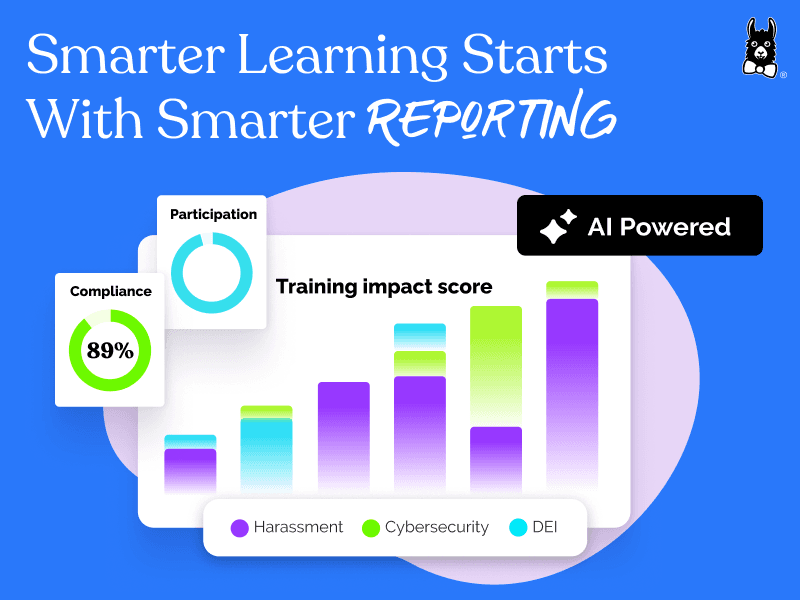
Learn how to track training progress and boost compliance with LMS reporting. Learn key metrics, automation tips, and how EasyLlama makes it effortless.
Test Your Compliance
Find out if your company is compliant in two minutes with our free Compliance Grader.
Get Your Free ReportTracking employee outcomes is paramount to developing a learning program that works.
With the right LMS reporting and analytics tools, HR teams can monitor progress in real time, identify gaps, and make smarter, data-driven decisions.
For mandatory training and company strategy alike, customizable reporting helps you stay aligned with your goals.
In this guide, we’ll break down the must-know metrics and features that support learning, and walk you through how to set up effective LMS reports the easy way.
You’ll learn how modern tools—like AI-generated reports, automated reminders, and integration with your existing HR systems—can help reduce administrative burden and deliver real business impact.
If you’re ready to make your data work harder and your training results stronger, this guide is for you.
The impact of effective LMS reporting on training outcomes
Effective LMS reporting plays a critical role in improving training outcomes by giving HR teams a clear view into learner progress, compliance status, and engagement levels.
Without it, teams often face challenges like having to track things manually or wrangling fractured data. These issues make it hard to prove compliance or course effectiveness. Modern LMS platforms solve this by offering real-time insights that help organizations stay audit-ready at all times.
Instead of scrambling for data before a deadline, HR teams should be able to easily monitor completions, flag issues, and adapt their training strategies.
Measurable benefits of LMS analytics
LMS analytics give HR teams the visibility they need to make smarter, faster decisions about training and compliance.
When raw data is instantly converted into actionable insights, organizations can improve engagement and more clearly demonstrate ROI to leadership.
EasyLlama makes it easy to go beyond measuring course completion rates and report on what drives meaningful progress.
Practical benefits include:
- More efficient compliance tracking that reduces manual reporting and data entry
- Improved training outcomes driven by real-time learner insights
- Reduced administrative overhead through automation and integrations
- Clearer communication of ROI and compliance progress to executives
For example, Natural Retreats streamlined its compliance tracking using EasyLlama’s reporting tools, while Showpad saw a major boost in completion rates after adopting integrated, automated reports.
Essential LMS reporting metrics for HR teams
Knowing which metrics to track can help HR teams move beyond guesswork and focus on what really drives progress.
EasyLlama’s LMS reporting dashboard makes it simple to view key compliance, engagement, and satisfaction metrics in one place. The interface is intuitive, and each report is designed to be easy to interpret, even for busy teams.
This visibility helps organizations stay compliant, adjust training strategies quickly, and communicate results with confidence.
Important metrics to track include:
- Enrollment and completion rates
- Drop-off and abandonment rates
- Average time spent per course
- Session frequency
- Assessment and quiz scores
- Pre- and post-training comparisons
- Compliance completion and overdue reports
- Learner satisfaction and NPS
By surfacing these insights in real time, EasyLlama helps HR teams make informed decisions, align with compliance goals, and demonstrate ROI to leadership.
Essential reporting features for HR compliance
HR teams need tools that do more than collect data. They need reporting features built to support audits, track completions, and drive accountability across the organization.
An LMS should be built with these needs in mind and reduce the manual work required to surface insights. Features like progress tracking, automated reminders, and custom dashboards can meet HR challenges head-on.
Here are some of the top features to look for when vetting an LMS.
Real-time progress and engagement tracking
Tracking real-time progress is one of the most valuable tools an LMS can offer. EasyLlama’s reporting dashboard gives HR teams immediate access to learner activity, making it easier to identify what is working and where support is needed.
Completion status, time spent per course, and assessment results are updated live. Admins no longer have to chase data across platforms.
Meanwhile, automated reminders help learners stay on track so training is completed on time. When every learner is on a different schedule, real-time data can keep the process organized and efficient.
Key metrics include:
- Completion rates across individuals, teams, or locations
- Average time spent per course or module
- Assessment scores and pass rates
- Learner activity trends, including login frequency and session duration
These insights should be always available, and always up to date.
Customized dashboards for stakeholders
Customized dashboards help HR teams surface the right data for the right audience. Administrators should be able to tailor reports to highlight key compliance and engagement metrics that matter most to different stakeholders.
For example, HR teams can monitor completion rates across departments, while senior leadership views ROI insights and organization-wide progress. Meanwhile, managers can access customizable dashboards that focus on their team’s status, overdue training, and engagement trends.
Reports should also be scheduled to send automatically, eliminating the need for manual updates. EasyLlama’s flexible configuration options make it easy to share clear, actionable information across the company, keeping everyone informed and aligned without extra admin effort.
Audit-ready compliance reports
Audit-ready compliance reports are a cornerstone of effective risk management.
EasyLlama simplifies this process by allowing HR teams to track every required training completion and certification in one central dashboard. With audit-ready documentation available on demand, administrators can respond to compliance checks quickly and confidently while reducing time spent gathering data from multiple systems.
Key compliance reports include:
- Completion summaries showing who has finished mandatory courses and who is overdue
- Certification and renewal tracking for roles requiring regular recertification
- Non-compliance reports highlighting training gaps across departments
- Historical records that document training progress over time
These built-in reports give HR leaders peace of mind, knowing their compliance data is accurate, accessible, and always ready for inspection.
Tracking accessibility across your organization
You need accessibility metrics to understand learning across different roles, locations, and devices. EasyLlama’s LMS supports inclusive learning by tracking usage across mobile and desktop, monitoring which languages are selected, and reporting on the use of accessibility features like closed captions or screen readers. These insights support a learner-centered compliance strategy by ensuring every employee can access and complete their training in a format that works for them.
Key accessibility metrics include:
- Course completions by device type
- Language selection and usage across learners
- Engagement with accessibility features such as transcripts or captions
With this visibility, companies can close participation gaps and improve training outcomes across a diverse workforce.
Common types of LMS reports
LMS reporting is most effective when it aligns with your training goals and compliance requirements. Different report types serve different needs, from tracking completions to identifying engagement trends.
1. Compliance Completion Reports
These reports show exactly who has completed each required training course and who is still overdue. This helps HR teams ensure compliance deadlines are met and provides clear documentation that can be referenced during audits or leadership reviews.
2. Engagement and Participation Reports
These reports measure how employees are interacting with training content, including how often they log in, which courses they start, and where they drop off. They are essential for understanding learner behavior and improving course design over time.
3. Assessment and Quiz Results
You’ll also want access to summaries of test scores, pass and fail rates, and knowledge gaps. With these types of reports, you can track which concepts need reinforcement and whether your training is effectively improving learner understanding.
4. Training Progress by Department or Location
Make sure you can get a breakdown of training activity by teams, departments, or physical locations. Admins can spot where additional support or reminders may be needed and ensure accountability across the organization.
5. Certification and Recertification Tracking
Certification and recertification tracking shows which employees currently hold required certifications, along with their expiration dates and retraining schedules.
Staying current with these timelines is essential in regulated industries where ongoing compliance is critical for maintaining legal and operational standards.
6. Audit and Regulatory Readiness Reports
Audit and regulatory readiness reports compile compliance data into clear, organized formats that align with common audit requirements. HR teams can quickly access documentation showing training completion, certification status, and timelines.
Having this information readily available helps organizations respond confidently to inspections and minimize the risk of penalties.
7. Custom Reports (AI or Advanced Analytics)
Custom reports allow administrators to generate tailored reports using filters, prompts, or advanced logic. These reports are great for surfacing business-specific insights or meeting leadership’s unique reporting needs.
EasyLlama’s LMS gives you access to a wide range of prebuilt and customizable reports to support every team and objective.
Example reports
Let’s take a look at some examples of the types of reports you can generate with a modern LMS.
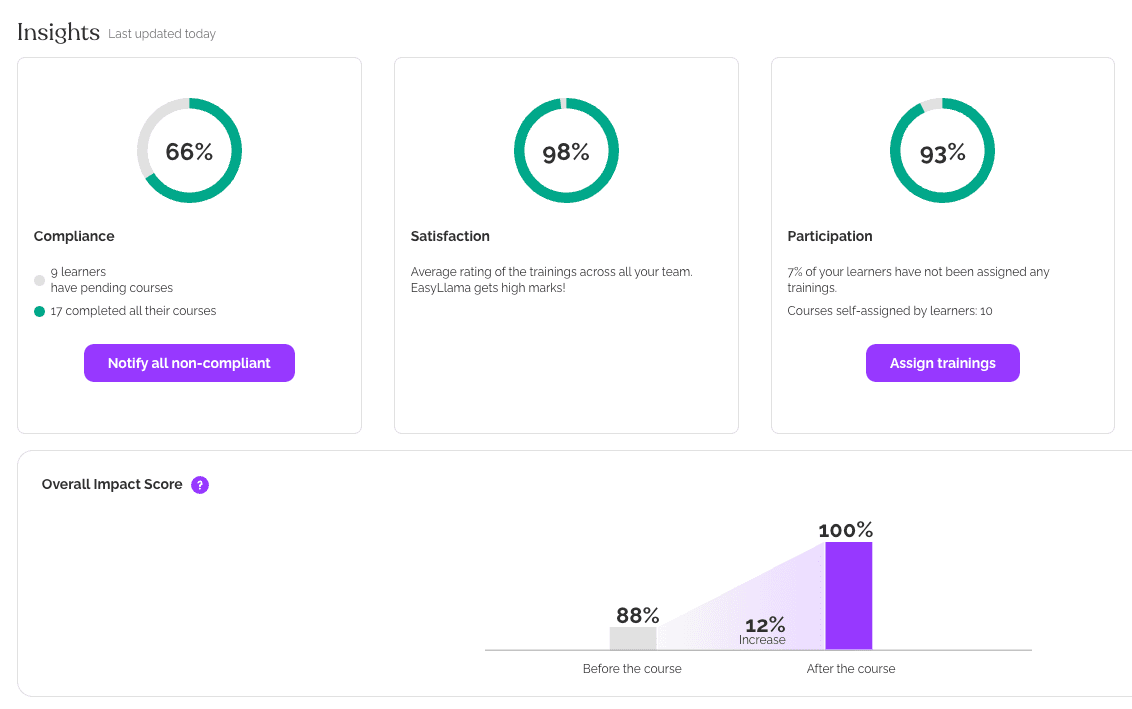
First, we have a learning management system dashboard with automatically-generated insights. This EasyLlama dashboard gives a quick overview of compliance, satisfaction, and participation stats.
L&D teams can easily see where they need to divert their attention. With high rates of satisfaction and participation, this dashboard shows that what is lacking is compliance. A learning manager could then update course assignments and notifications to make sure learners know which courses they need to complete.
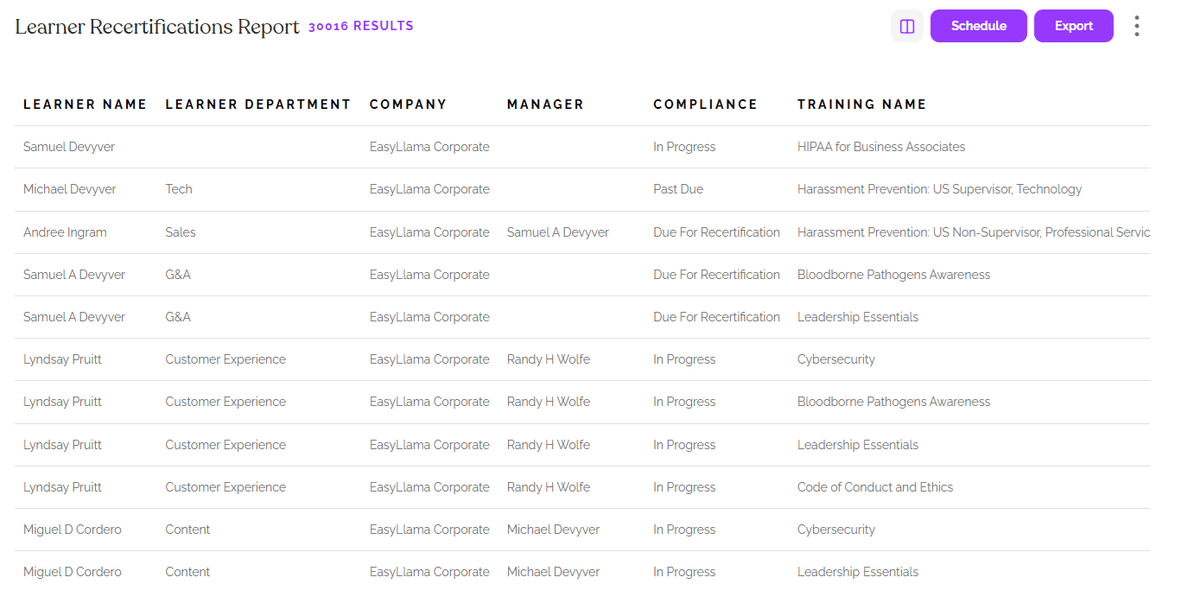
And next, we have a Learner Recertifications Report. L&D teams can run this report at any time to discover which employees need to be recertified across all training types. They can then confirm course assignments, check that course content is up to date, and make any updates as needed.
Configure powerful LMS reports in four steps
Creating LMS reports that are both insightful and easy to share starts with the right setup. In this section, we’ll walk through four practical steps using EasyLlama’s tools to configure powerful reports that support compliance, engagement, and business alignment.
Step 1: Define your compliance reporting goals
Before building any reports, take time to clarify the goals you want to achieve.
Clear objectives ensure you’re tracking the right data and aligning reports with your organization’s compliance needs. For some companies, this may mean proving completion of state-mandated training. For others, it may involve tracking certifications across departments or identifying trends in learner engagement.
EasyLlama’s Smart Assign tool makes this easier by suggesting required trainings based on your industry and location.
Common reporting goals include:
- Meeting state or federal compliance regulations
- Monitoring progress toward internal training benchmarks
- Tracking certification status by department or job function
- Measuring engagement trends over time to improve training outcomes
Collaborate with HR, legal, and department leaders to define your goals upfront. This sets the foundation for reports that are useful, accurate, and aligned with broader priorities.
Step 2: Select and set up your report types
Once your goals are defined, the next step is selecting the report types that best support them.
EasyLlama offers a library of pre-built reporting templates designed to address common reporting needs, including course enrollment, learner enrollment, and recertifications.
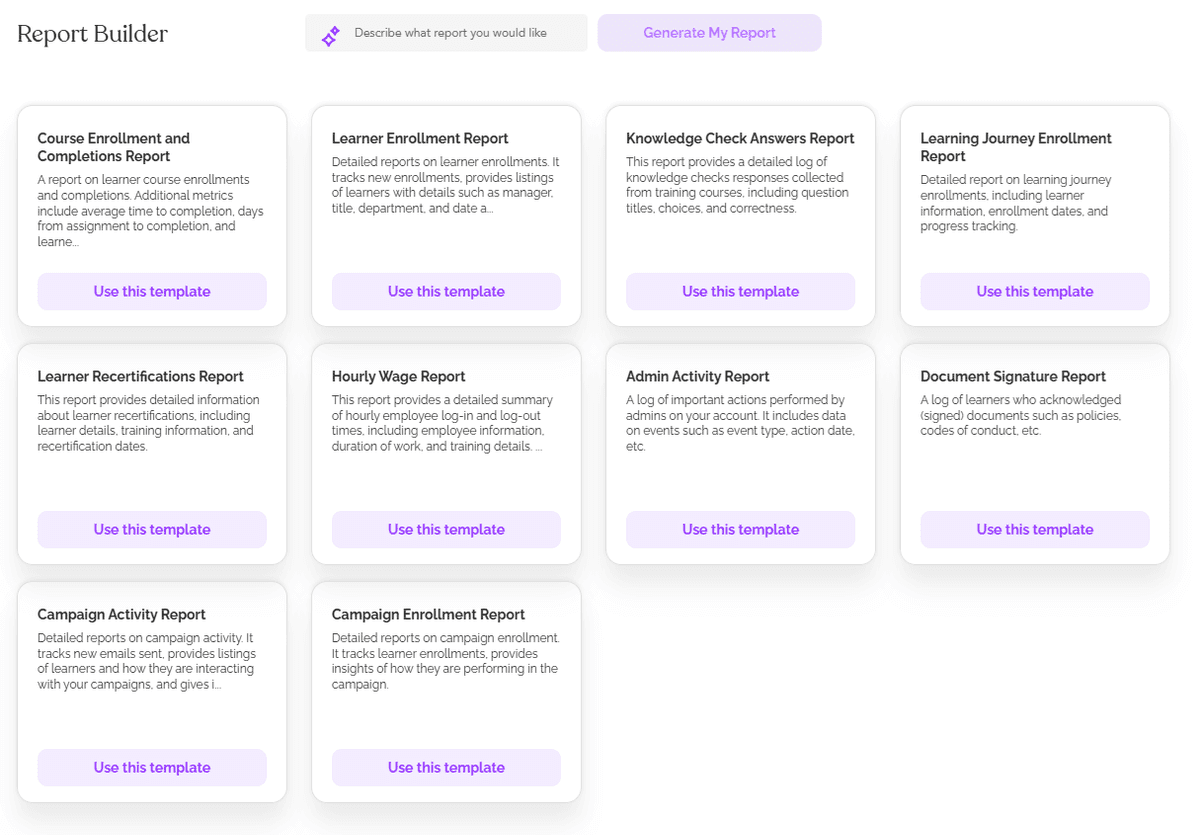
For more complex or customized needs, the AI Report Builder allows you to generate detailed reports using a simple prompt, making it faster to produce audit-ready documentation. You can also apply filters such as job role, location, or overdue status to tailor each report to the audience that needs it most.
Step 3: Personalize dashboards and automate delivery
Once your reports are in place, the next step is to personalize dashboards for the people who use them. Different teams need different levels of detail. HR may need a full view of compliance status, department managers might want to track their team's progress, and executives will likely care most about ROI and overall completion trends.
EasyLlama makes it easy to tailor each dashboard to highlight the insights that matter most.
Types of stakeholder dashboards include:
- HR dashboards focused on compliance gaps and overdue training
- Department dashboards showing team-specific completion rates
- Executive dashboards highlighting ROI and strategic impact
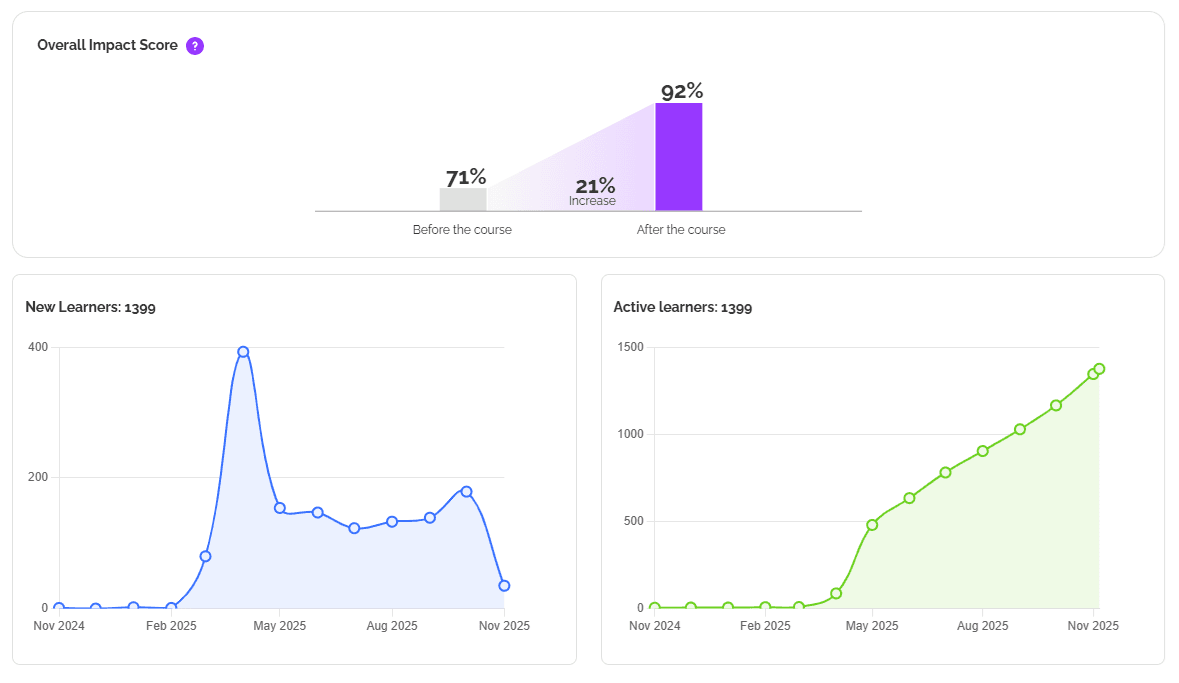
To keep everyone aligned, schedule automated email delivery of reports. This ensures the right information reaches the right people without added admin work. For example, Waud Capital Partners relies on EasyLlama’s automated reminders to stay ahead of training deadlines.
Smart automation also helps with follow-up. EasyLlama’s alert system flags overdue learners and sends them reminders based on your schedule.
Key benefits of automation include:
- Fewer manual tasks for admins
- Timely alerts that improve learner accountability
- Increased visibility without additional reporting cycles
Personalized dashboards and automation help teams stay informed, proactive, and focused on what matters most.
###Step 4: Connect your LMS with existing HR systems
The final step to building powerful LMS reporting is connecting your data to the systems your team already uses. EasyLlama integrates with leading HRIS, payroll, and business intelligence tools so you can centralize reporting, reduce duplicate data entry, and ensure compliance insights are always current.
For example, Sounds True was able to launch faster thanks to EasyLlama’s seamless integration with BambooHR. Once connected, reporting becomes more efficient and scalable across departments and locations. To maintain accuracy, plan regular audits of your integrations and make sure all synced fields align with evolving compliance requirements.
Common integration partners include:
- HRIS platforms
- Payroll systems
- Business intelligence tools
Use EasyLlama’s integration library to quickly connect systems and automate data flows.
To see how it works in action, book a custom demo and explore our connected compliance solutions.
Share this


Frequently
Asked
Questions

- LMS reporting is how you track and understand what’s happening inside your training program. It shows who’s completed what, where gaps exist, and how teams are progressing toward compliance.
- Focus on completion rates, quiz scores, time spent on training, and certification status. These numbers help you spot non-compliance and measure the overall effectiveness of your training strategy.
- LMS analytics gives you a real-time view of completions, deadlines, and certifications. It keeps HR teams ahead of audits and makes it easier to spot issues before they become risks.
- You need real-time progress tracking, audit-ready reports, automated reminders, and custom dashboards. Integrations with HR tools also help you keep everything in sync without extra admin work.
- Look at completions by device, language, and use of features like closed captions or screen readers. This helps ensure your training is accessible and inclusive for all learners. Effective LMS reporting turns training data into strategic insights that support compliance, improve engagement, and drive real business outcomes.
 Articles
Read More Blogs
Explore what others in your field are learning

LMS Implementation Strategy: 6-Step Guide for HR and L&D Teams
Learn how to implement your new LMS with ease. This 6-step LMS implementation guide helps HR & L&D teams plan, launch, and measure success.
Sarah Hamilton

LMS Competency: How To Support Skill-Based Digital Learning
Learn what LMS competency means, how it supports skill-based learning, and how EasyLlama helps track and build workforce readiness.

Blaine Sanders

HR Compliance Checklist: The Complete Guide 2026
HR's 2026 guide to ensure company-wide compliance with regulatory and risk management tactics.
Sarah Hamilton
Start Modernizing Workplace Compliance
It’s easy to get started with EasyLlama. Speak with one of our compliance experts and get a demo tailored to your business’s needs.