Reporting Security Awareness Training: What Leadership Actually Wants to Know



Learn how to report Security Awareness Training progress to different stakeholders and why completion rates alone aren't enough.

Learn how to report Security Awareness Training progress to different stakeholders and why completion rates alone aren't enough. Walk away knowing which metrics to focus on, the right cadence for reporting, and where to focus tracking.
- What different leaders want from your security awareness training reports
- What to include in your security awareness training report (beyond completion rates)
- How to structure a security training report for leadership
- Building a reporting cadence that turns security training into a leadership conversation
Test Your Compliance
Find out if your company is compliant in two minutes with our free Compliance Grader.
Get Your Free ReportSooner or later, someone in leadership, an investor, or a board member, asks the question: "Are we safer from security threats than last quarter?"
Many HR teams are diligent and run security awareness training all year. They assign the courses, test employees with phishing simulations, send reminders, and chase down the stragglers.
However, when it comes to actually answering if the company is safer than before, the answer they usually have is a completion percentage. Without understanding how employee behavior has changed, you have an incomplete picture of whether the organization is actually safer.
As a technology leader, I sit on both sides of this conversation. I'm the one who worries about how an attacker gets in, and I'm also the one who has to explain our risk posture in plain terms to people who don't live in security dashboards. The gap between running a training program and reporting its impact is often where it becomes harder to demonstrate the program's value to the C-suite.
It's also completely fixable.
Here's my view: when you combine training completion data with phishing simulation results, and present them in reports built for each audience, security awareness training stops being a checkbox. It becomes a business conversation, and one that earns continued investment.
What different leaders want from your security awareness training reports
Not every leader reads your report for the same reason. A CISO, a CHRO, and a board member can look at identical data and come away with completely different questions. Reporting security awareness training well means knowing which question each of them is asking, then framing the data around their priorities instead of your operational details.
What CISOs, HR leaders, and board members each need from your report
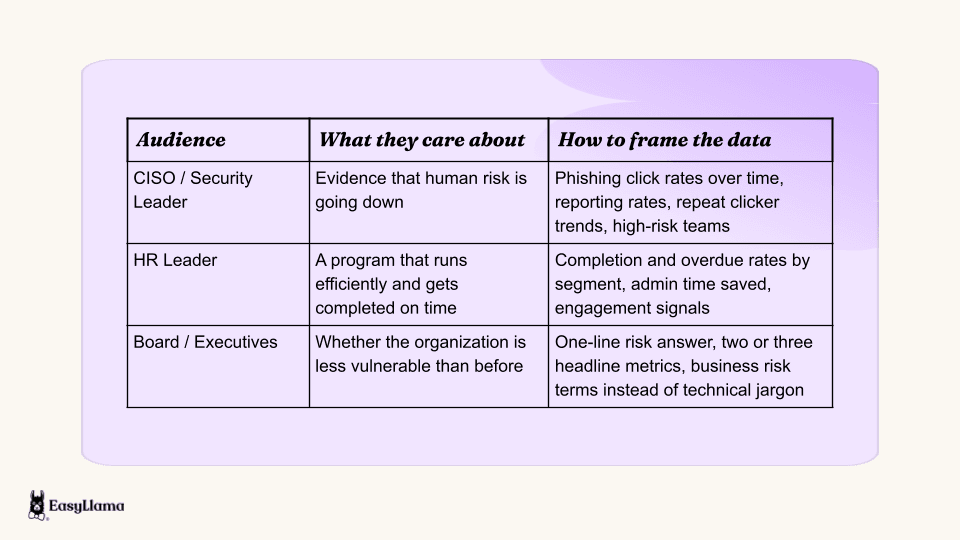
CISOs want risk reduction evidence. They care whether phishing click rates are trending down, whether the same people keep failing, and whether employees are flagging suspicious messages instead of ignoring them. Their concern is well founded. In 2026, 79% of CISOs identified human risk as their organization's biggest cyber vulnerability, up from 66% in 2025.
HR leaders want proof that the program is efficient. Are employees completing training on time? Is engagement high enough to justify the spend? How much admin work does it take to keep the program running? These are fair questions and they deserve concrete answers.
Board members and executives want a simple answer. Is the organization less vulnerable than it was? They don't need a breakdown of template categories. They need the result, framed as business risk. The stakes are easy to put in those terms: the global average cost of a breach is at a record $4.99 million, a 12% increase over the prior year. Boards are also paying closer attention to security than they used to. 86% of CISOs now believe cybersecurity expertise should be required at the board-director level, up from 66% a year earlier.
The takeaway is that the same data can serve all three audiences. What changes is the lens you put on it.
Completion rates are not the full story
At a quick glance, a 95% completion rate is good news. But on its own, it doesn't tell you whether employees are actually less likely to fall for a security threat.
Completion tells you people sat through the training, but it doesn't tell you whether they'd spot a spoofed invoice at 4:45 p.m. on a Friday. That distinction matters because people remain the most common factor in breaches. In 2026, a human element was present in 62% of breaches...yikes.
Which is why leadership now more than ever increasingly expects behavioral evidence. Did training change what people do, not just what they sat through? That means the shift in your reporting should look like this:
Before: "97% of employees completed security awareness training."
After: "Phishing click rates have dropped every quarter since we launched simulations, and our list of repeat clickers is half what it was."
The second version is the one that gets a CISO to lean in and a CFO to stop asking whether the program is worth it.
What to include in your security awareness training report (beyond completion rates)
A strong report tells a story about risk reduction, and each data point should earn its place in that story. Here's what I'd include and why.
Training completion and compliance status
Completion is still the foundation. Report on the full status picture across the workforce:
- Assigned training, so leaders see the scope of the program
- Completed and overdue training, which show where follow-up is needed
- Failed or incomplete attempts, a signal to revisit content or delivery
- Exempted employees, documented so exemptions don't look like gaps during an audit
Then segment it. A company-wide completion rate can hide a warehouse location sitting at 60% or a sales team that hasn't opened a course in months. Break the data down by department, location, role, and employee type so leadership can see exactly where the gaps are.
This is where manual reporting starts to hurt. Exporting a spreadsheet, pivoting it by department, then doing it again for location every quarter gets old fast. EasyLlama's reporting centralizes real-time training data so admins can track completions, overdue assignments, and participation rates segmented by department, role, or location. Admins can build customizable dashboards for different teams or programs, and the built-in AI Reporting Assistant creates custom widgets and reports from a plain-language request, so HR can spot compliance gaps without rebuilding a report every time.
Kierston Vaughn, SVP of Tiger Pistol Operations at Tiger Pistol, described the value of that at-a-glance view: "It's pretty easy for me to stay on top of things, and the dashboard is really easy to use. It's red, orange, or green based on whether people have completed their training, so that makes it really simple."

Phishing simulation results and behavior-change signals
If you only add one thing to your report, make it this. Phishing simulation data gives you behavioral evidence of whether training is working by showing how employees respond to simulated threats.
The key behavioral metrics to track:
- Click-through rate on simulated phishing emails. This is the core of security awareness training click rate reporting, and the metric leadership will remember.
- Reporting rate, or the share of employees who flagged the test instead of ignoring or clicking it. A rising reporting rate shows people are becoming active defenders.
- Repeat clickers, meaning employees who fail more than one simulation. This group usually represents concentrated risk and a clear target for intervention.
- Improvement over time, tracked quarter over quarter, so leaders see a trend instead of a snapshot.
There's good external evidence that sustained simulation and training move these numbers. Before any security awareness training became a global norm, the average share of employees likely to fall for a phishing test was 33.2%. Organizations that committed to a full year of continuous training cut that by an average of 87%, down to 4.2%. The biggest gains come between month three and month 12, not in the first 90 days.
That's an incredibly useful point to share with your leadership: this is a program, not a one-time campaign, and the results compound over time.
It's also worth widening your lens beyond email, as technology used at work widens as well. In 2026, the median click rate for mobile-centric attacks, like voice and text messages, is 40% higher than for email. Your training and reporting should reflect the channels attackers are actually using.
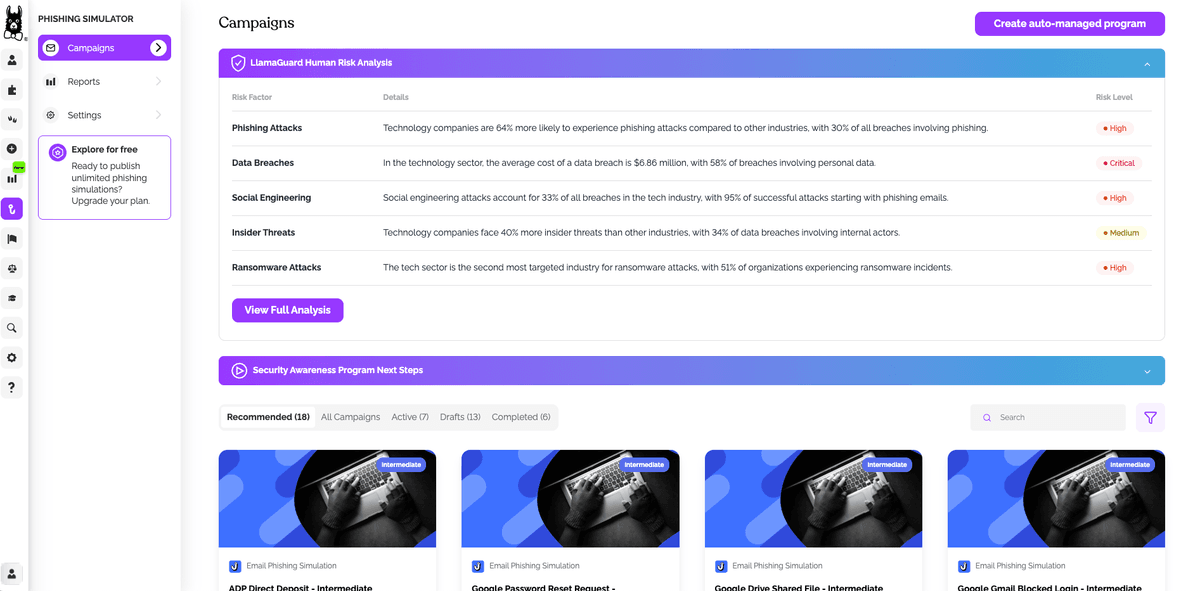
EasyLlama's Phishing Simulator sends realistic phishing tests drawn from a library of 200+ templates, with campaigns that mimic everyday tools like Gmail, Outlook, LinkedIn, and Zoom. When someone clicks, they get instant, in-the-moment coaching, followed by micro-lessons that reinforce the right behavior while the mistake is still fresh. It also supports an Outlook "report phishing" button, so you can measure reporting alongside clicks.
Phishing Simulations can be paired with courses from EasyLlama's 500+ course library, including dedicated Security Awareness training on topics like recognizing phishing attempts, email security, ransomware awareness, preventing data leaks, and data breach response. The courses build knowledge, while simulations help measure how that knowledge translates into behavior.
From there, the AI-powered risk analysis surfaces repeat clickers, high-risk teams, and trends over time. That gives HR a concrete behavior-change signal to put in front of leadership, well beyond "people finished the course."
Policy acknowledgment and audit readiness
Training shows employees learned something. Policy acknowledgment shows they received, reviewed, and signed off on the security policies that apply to them. Tracking the two side by side strengthens your report, especially when legal, audit, or an insurer asks for evidence.
EasyLlama's Document Management centralizes policy assignment, signature collection, and bulk-exportable completion certificates. When an auditor or investigator asks for proof, HR can pull training and acknowledgment evidence from one place instead of hunting through inboxes and shared drives.
How to structure a security training report for leadership
Once you know what to include, the next question is how to organize it. This framework works regardless of audience, because it puts the answer first and the detail after.
1. Start with the headline: "Are we safer than last quarter?"
Open every leadership report with a one-line answer to that question. Then support it with two or three headline metrics.
For example:
We are measurably less vulnerable than last quarter. Phishing click rate is down 18%, training completion is at 97%, and repeat clickers have been cut in half.
Think of this as your executive summary. It's the section busy leaders read first, and sometimes the only one they have time for. If it doesn't answer the question on its own, rewrite it until it does.
2. Layer in the evidence by audience
After the headline, add the supporting detail in layers so each stakeholder can find what they need:
- Security stakeholders: risk reduction metrics, including click rates, reporting rates, repeat clickers, and high-risk teams
- Legal and audit stakeholders: compliance status, overdue training, and policy acknowledgments
- HR and operations stakeholders: program efficiency, including completion timelines and admin effort
The most useful single visual here is phishing click rates by department shown next to completion status. That combined view answers both "did they take the training?" and "is it working?" in one glance. It also tends to surface the uncomfortable finding leadership needs to see, like a department with near-perfect completion and a stubbornly high click rate.
Because EasyLlama's Phishing Simulator, security awareness courses, and reporting live in one platform with one admin view, HR can pull a combined report showing behavioral risk by department without stitching exports together by hand.
3. Include the "what we did about it" section
Don't end the report with data. Leadership wants to know HR is acting on what it found. Close with the actions you took, or plan to take, such as:
- Targeted retraining for high-risk groups and repeat clickers
- Manager follow-ups for employees with overdue training
- Role-specific interventions for departments with elevated click rates
- Adjustments to simulation frequency or training cadence based on the trend
Automation keeps this sustainable. With EasyLlama's Workflow Automations, admins can automatically assign courses, Learning Journeys, or documents based on triggers like a new hire, supervisor promotion, or location change. Automated reminders can go out by email and text, so HR doesn't have to chase completions one person at a time.
Sarah Kim, Associate Manager of People Operations at Core Digital Media, summed up what that feels like on the admin side: "Reaching out and getting any questions answered is simple, working through the courses is simple, getting people to do the courses is simple."
Building a reporting cadence that turns security training into a leadership conversation
Reporting security awareness training results isn't about proving people clicked through a course. It's about showing leadership that employee behavior is changing and that the organization is measurably less vulnerable.
Consistency is what builds trust in those numbers. Here's a cadence I'd recommend:
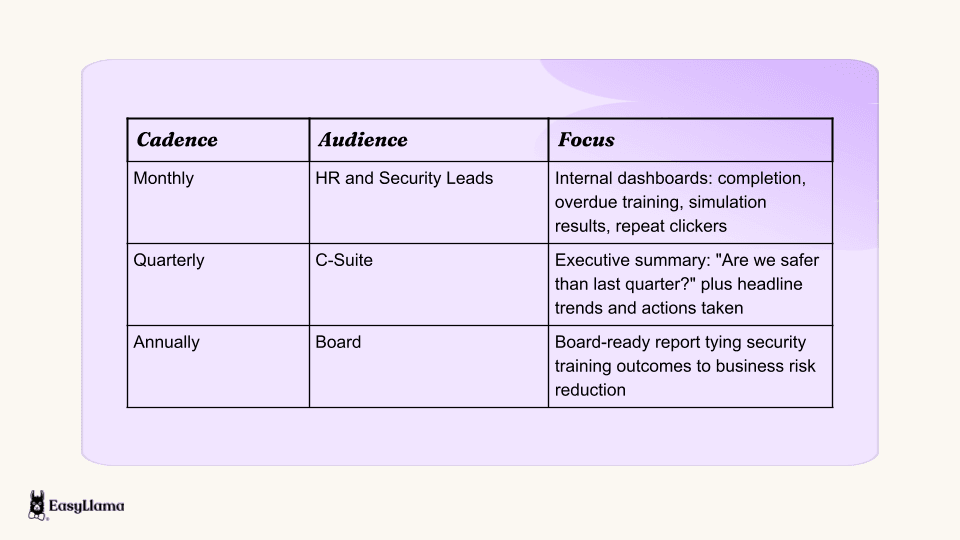
A steady cadence keeps security awareness visible as an ongoing program rather than a one-time initiative. It also means leaders start to expect the trend line, which makes a dip easier to explain and an improvement easier to celebrate.
None of this works if your reports pull from stale employee data. EasyLlama's HRIS and payroll integrations sync employee data from systems like BambooHR, Workday, Gusto, ADP, and Paylocity on a daily basis, so records stay current when someone is hired, changes departments, or moves to a new location. Every report draws from the same up-to-date source, without manual reconciliation.
The two outputs that matter most are training completion data and phishing simulation results. Together, they answer the question leadership keeps asking: "Are we less vulnerable than last quarter?"
That's why we built EasyLlama to bring testing, training, and reporting into one platform. HR gets the data and dashboards to make that case with confidence, and security leaders get the behavioral evidence they've been asking for. As Emily Fieser, Director of Culture and Development at Natural Retreats, put it: "If anyone's searching for a platform that handles everything regarding employee compliance and security training, from A to Z, EasyLlama is the answer, hands down."
Want to see it with your own data? Book a demo to see how EasyLlama's AI-powered reporting and Phishing Simulator help HR teams report real risk reduction to leadership.
Share this


Frequently
Asked
Questions

- Lead with a one-line answer on whether risk is going down, then support it with phishing click rate trends, reporting rates, repeat clicker counts, and training completion. Keep technical detail in an appendix for security stakeholders.
- A practical cadence is monthly dashboards for HR and security leads, quarterly executive summaries for the C-suite, and an annual board-ready report that ties training outcomes to business risk.
- Completion rates show whether employees finished assigned training. Behavior-change metrics, like phishing click rates and reporting rates, show whether that training changed what employees actually do when they face a real threat.
- Simulations give you direct evidence of employee behavior under realistic conditions. That lets you report on click rates, reporting rates, and repeat clickers over time instead of relying on completion alone.
- Yes. Platforms like EasyLlama centralize training and simulation data in real-time dashboards, and an AI Reporting Assistant can generate reports from a plain-language request, so HR doesn't have to rebuild spreadsheets every quarter.
 Articles
Read More Blogs
Explore what others in your field are learning

12 Email Security Best Practices for a Compliant Team
A checklist of 12 email security best practices to prevent phishing, meet compliance, and train employees with an incident response plan.
Michael Devyver
![12 Best Security Awareness Training Providers [2026]](/_next/image?url=https%3A%2F%2Fd230yvp9l0f4m2.cloudfront.net%2FCybersecurity_654735261c.jpg&w=1200&q=75)
12 Best Security Awareness Training Providers [2026]
Discover the 12 best Security Awareness Training providers that drive real behavior change—not just compliance checkboxes.
Michael Devyver

Phishing Red Flags: Recognizing and Avoiding Online Scams
Learn to identify phishing red flags and protect yourself from online scams. Stay safe from cyber threats with these tips for recognizing phishing attempts.
Michael Devyver
Start Modernizing Workplace Compliance
It’s easy to get started with EasyLlama. Speak with one of our compliance experts and get a demo tailored to your business’s needs.