12 Email Security Best Practices for a Compliant Team



A checklist of 12 email security best practices to prevent phishing, meet compliance, and train employees with an incident response plan.

A checklist of 12 email security best practices to prevent phishing, meet compliance, and train employees with an incident response plan.
Test Your Compliance
Find out if your company is compliant in two minutes with our free Compliance Grader.
Get Your Free ReportEmail phishing is still the number one way attackers reach employees. According to the UK Government’s Cyber Security Breaches Survey 2025, phishing remains the most common cause of cyber incidents, often starting with a single click. That one mistake can lead to downtime, regulatory fines, data loss, and long recovery cycles that small and mid-sized teams can’t afford.
The good news is that teams can prevent most email-based attacks. A focused set of email security best practices can dramatically reduce risk while supporting compliance requirements and day-to-day productivity. The key is combining clear technical controls with employee habits that actually stick.
This guide breaks down the 12 most important email security best practices for building a compliant, resilient team. You’ll get a practical checklist you can roll out across the business, a simple incident-response playbook for when something goes wrong, and a clear view of how EasyLlama helps teams train employees, automate security awareness, and stay audit-ready without adding complexity.
The top 12 email security best practices for a compliant team
These email security best practices are the practical steps employees and admins can take right away. These best practices also happen to double up as a practical rollout checklist for HR and IT teams.
1. Spot phishing and handle links/attachments safely
Phishing emails often look legitimate at a glance, which is why slowing down matters. Employees should hover over links to preview URLs before clicking and confirm the sender’s display name and domain match the real organization. Attackers frequently use look-alike domains or friendly names to create false trust.
Unexpected attachments are another common entry point. If employees aren’t expecting an email, they should avoid opening attachments or enabling macros, even if the message feels urgent. Instead of deleting suspicious emails, teams should use the “Report Phishing” button so IT can investigate and protect others.
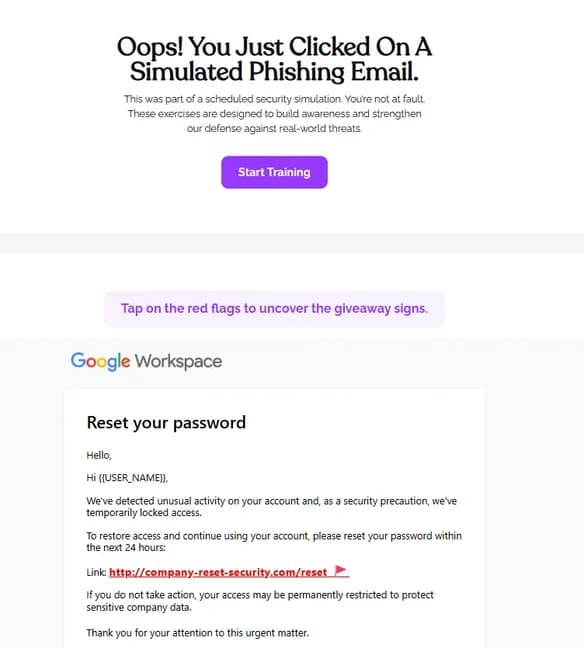
To reinforce this behavior, pair policy rollout with EasyLlama’s phishing simulations and instant coaching, so employees practice spotting real-world threats and learn from mistakes in the moment.
2. Turn on multi-factor authentication for all email accounts
Multi-factor authentication (MFA) is one of the most effective ways to stop account takeovers, even if a password is stolen.
Enforce MFA everywhere employees access email, including phones and third-party apps.
Organizations should require MFA across the entire organization, not make it optional or role-based, especially for:
- Microsoft 365 and Google Workspace email accounts
- Mobile email apps and browser access
App-based authenticators and passkeys provide stronger protection than SMS, which can be intercepted or bypassed.
When teams make exceptions for executives or service accounts, they create high-value gaps that attackers actively target. Apply coverage consistently and enforce it by default.
3. Use strong passwords and a password manager
Strong passwords still matter, but employees shouldn’t be expected to manage them on their own. The goal is to reduce password reuse, lower friction, and close off common attack paths that target email accounts.
Make sure to:
- Require unique passphrases that are long, hard to guess, and never reused across work systems
- Provide a vetted password manager so employees can store credentials securely and receive breach alerts
- Disable legacy or Basic authentication to block password spraying and older sign-in methods that attackers rely on
Use unique passwords, manage them centrally, and enforce modern authentication controls. These steps make email accounts much harder to compromise, even when attackers have already stolen credentials.
4. Deploy spam, anti-malware, and safe link/attachment protections
Email security tools act as a safety net, catching threats before they reach employees. Most organizations can start with native protections like Microsoft 365 Defender or Google Workspace, while higher-risk environments may add a secure email gateway for extra filtering and visibility.
IT teams should turn on safe links and safe attachments so the system scans links and files when employees click them, not just when the email first arrives. Blocking macros from the internet further reduces risk, since many malware campaigns rely on tricking users into enabling them after opening a file.
High-risk messages should never land directly in inboxes. Quarantining suspicious emails by using anti-malware tools and routing them to admins for review helps stop threats early, prevents the same attack from reaching more employees, and gives IT teams clearer insight into the types of attacks targeting the organization.
5. Encrypt sensitive emails and know when to use it
Employees shouldn’t send sensitive information in plain text. Teams should clearly define when email encryption is required, such as when sharing personally identifiable information (PII), protected health information (PHI), financial details, or other regulated customer data. Clear rules remove guesswork and help employees make the right call quickly.
Most email platforms include built-in encryption tools, but they only work if employees know how to use them. Provide simple, step-by-step instructions for sending encrypted messages so security doesn’t slow work down.
Write policies that spell out exceptions and define a clear escalation path. If teams can’t use encryption or face time-sensitive issues, employees need to know who to contact and which secure alternative they should use.
6. Back up mailbox data and test restores
Email data is often critical for investigations, audits, and business continuity, which is why backups matter. Organizations should align retention policies with legal and regulatory requirements, not just default platform settings, and they should extend backups beyond inboxes alone.
Just as important, teams need to test restores on a regular schedule and document the results so recovery isn’t a guessing game during an incident. When teams complete backups and test them regularly, they can recover quickly from accidental deletion, ransomware, or account compromise.
7. Monitor account activity and alerts for suspicious behavior
Monitoring email accounts helps teams catch attacks early, before real damage is done. Many compromises don’t look obvious at first, so visibility matters just as much as prevention.
IT teams should focus alerts on changes attackers commonly make after gaining access and route those signals directly to the right responders for fast action. Here are a few examples:
- New or modified forwarding and mailbox rules
- Sign-ins from unexpected locations or high-risk geographies
- New OAuth app grants or consent activity
- Unusual spikes in outbound email volume
You should tie these alerts directly into your incident-response playbook so teams know exactly what to do when something triggers. Clear signals and clear next steps reduce response time and limit impact.
Teams that use a mass email service for marketing should flag scheduled send windows with IT so legitimate high-volume campaigns aren't flagged as anomalous activity.
8. Establish clear email security policies and reporting
Clear policies set expectations and remove uncertainty when it comes to email risk. Teams should document acceptable use, how sensitive data must be handled, and when extra verification is required for vendor payment changes or financial requests. Simple, plain-language policies are far more likely to be followed than long, legal-heavy documents.
Reporting matters just as much as policy. Employees need a clear “see something, say something” process with defined SLAs, so they know how and when issues will be reviewed. Organizations can use EasyLlama’s Cybersecurity Leadership Training to help managers understand their role, reinforce policy consistently, and respond quickly when email risks surface.
9. Separate work and personal email; only use approved devices
Keeping work and personal email separate reduces risk and makes incidents easier to contain. Personal inboxes don’t follow company security controls, which is why business communication should stay in approved systems and on trusted devices. This separation also helps IT respond faster when something goes wrong.
To enforce this separation, organizations should implement the following controls:
- External auto-forwarding blocked
- Personal email disabled on corporate devices
- Company-managed devices or MDM controls for BYOD
- Corporate email required for vendors and contractors when possible
When organizations limit access to approved devices and accounts, they give teams better visibility and control. It also creates clearer boundaries for employees, vendors, and contractors, which lowers exposure without slowing work down.
10. Log out, lock screens, and secure mobile access
Logging out and locking screens protect email from quick, avoidable compromises. Set short auto-lock timers so devices secure themselves when employees step away, and enable remote wipe to protect inboxes if a phone or laptop goes missing. Treat mobile access with the same care as desktop access, since attackers often target phones first to bypass stronger controls. Make sure to:
- Set short auto-lock timers on all devices
- Enable remote wipe for laptops, tablets, and phones
- Avoid shared or public computers for work email
- Use VPNs or personal hotspots instead of public Wi-Fi
- Require OS and app updates before allowing email sync
By securing devices and access points, teams reduce exposure from lost hardware, unsafe networks, and outdated software without adding friction to daily work.
11. Keep software current across endpoints
Keeping software up to date closes many of the gaps attackers rely on to access email accounts. Teams should treat patching as a routine, automate it wherever possible, and make it a core part of email security rather than an IT afterthought. When organizations prioritize updates, they reduce preventable exposure.
IT teams should patch operating systems, browsers, and email clients to close known vulnerabilities and automate updates to avoid missed fixes. They should track update compliance across endpoints so they can quickly spot gaps and remediate exceptions before they turn into risk. Teams should also include mobile operating systems and mail apps in patching policies, since employees often access the same inboxes from phones and tablets as they do from laptops.
When teams keep software current across all endpoints, they reduce exposure to known exploits and strengthen every other email security control they have in place.
12. Train continuously with awareness courses and phishing simulations
Training works best when teams deliver it continuously and make it realistic, not when they treat it as a once-a-year checkbox. Start with an annual security awareness baseline course, then reinforce it with quarterly microlearning refreshers that reflect how real attacks evolve. Regular practice builds muscle memory and prepares employees to respond to simulated business email compromise (BEC), vendor fraud attempts, and QR code or SMS-to-email phishing scenarios.
Teams need more than generic training for measurable impact. EasyLlama’s Security Awareness Training and the AI Phishing Simulator help reduce repeat clickers, deliver instant coaching after mistakes, and give teams clear data to prove progress over time.
Monitoring and incident response for email threats
Email attacks move fast, so teams need a clear way to spot issues and act. This playbook gives HR and IT a shared starting point.
Monitor for early warning signs
Most email breaches show warning signs if teams know where to look. Attackers often adjust settings to stay hidden or spread messages, making ongoing monitoring critical. Reviewing activity in admin tools helps teams catch problems early instead of reacting after damage is done.
Teams should actively monitor for:
- New forwarding rules or mailbox rule changes
- Sign-ins from unexpected locations or unusual geographies
- Sudden spikes in sent email or unexpected auto-replies
- Vendor domain changes or reply-to mismatches
- Activity logs in M365 Defender, Google Admin, or a SIEM
Watching these signals in the right systems helps teams detect email threats faster and respond with confidence.
Respond quickly to clicks or credential theft
When an employee clicks a malicious link or enters credentials, fast action limits damage. The goal is to contain access, remove persistence, and capture what happened while teams still remember the details.
HR and IT should follow the same steps every time to avoid confusion and missed actions:
- Isolate the affected device
- Revoke active sessions and tokens
- Reset email and related credentials
- Remove malicious mailbox rules and forwarding
- Review OAuth grants and scan endpoints
- Notify stakeholders and document actions and timing
A clear, repeatable response helps teams contain incidents quickly and improve future prevention.
Prevent wire fraud and BEC losses
Business email compromise and wire fraud rely on urgency and trust, not technical exploits. Attackers impersonate vendors or executives and pressure teams to rush payment changes before anyone verifies the request. Clear controls slow these attacks down and give employees the space to question suspicious instructions.
Teams should verify payment changes through a second channel, such as a direct phone call, and require dual approvals for high-value or unusual transfers. They should also document bank contacts and law enforcement escalation steps in advance so they can act quickly if fraud occurs. Strong verification and approval processes turn high-risk requests into routine checks and help teams stop fraud before money leaves the business.
Practice and reinforce the response plan
Practicing the plan turns a written response into muscle memory. Teams that rehearse incidents respond faster and make fewer mistakes when a real email attack happens. Regular practice also exposes gaps before attackers do.
Consider implementing these practice methods:
- Run quarterly tabletop exercises with HR and IT
- Review phishing drills and recent incidents together
- Track time-to-detect and time-to-contain for each scenario
- Use an IR flowchart to visualize roles and steps
Consistent practice keeps the response playbook clear, current, and effective when it matters most.
How EasyLlama helps with email security best practices
EasyLlama helps teams turn email security best practices into habits through focused training, smart automation, and clear compliance documentation. The platform supports HR, IT, and managers without adding extra work.
Increase completion and engagement
EasyLlama combines the Security Awareness Platform with an AI-Powered Phishing Simulator to help employees recognize real threats and respond correctly. Scenario-based lessons mirror everyday situations like vendor emails and executive requests, which makes the training easier to relate to and apply. When someone makes a mistake, instant coaching explains what went wrong and how to spot the same tactic next time, reducing repeat clickers over time.
Teams can track progress and readiness across departments, roles, and locations from a single dashboard. This visibility helps leaders identify risk areas early, reinforce training where it’s needed, and show steady improvement without chasing completions manually.
Automate cadence and reminders
Manual follow-up is one of the biggest blockers to consistent security training. Automating assignments and reminders ensures employees get the right training at the right time without HR or IT chasing completions. It also keeps email security visible throughout the year instead of fading after onboarding.
To streamline training management, teams should:
- Auto-assign courses by role, team, or risk level
- Set custom training frequencies and recertification schedules
- Send automatic reminders before and after due dates
- Integrate with HRIS, LMS, or payroll systems
With automation in place, training runs quietly in the background while teams stay compliant.
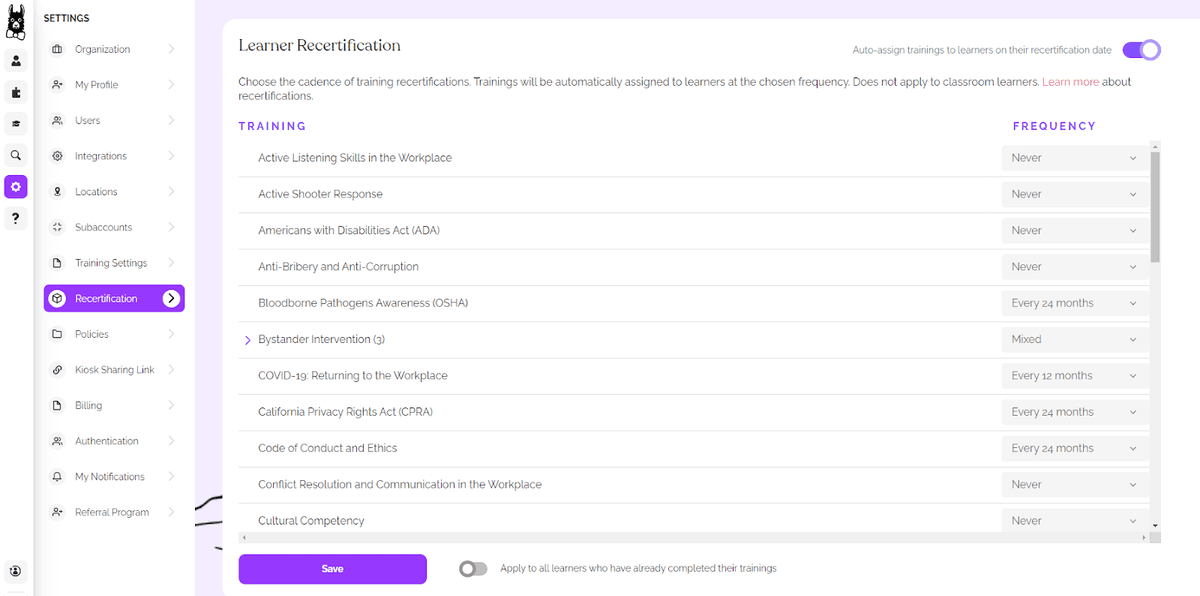
Prove compliance with documentation
Clear documentation makes audits faster and far less stressful. EasyLlama gives teams instant access to training certificates and a real-time completion dashboard, so proof is always available when regulators or auditors ask. HR and IT can quickly confirm who completed what, and when, without pulling data from multiple systems.
For formal audits, teams can export records in bulk to support HIPAA or GDPR requirements. Filters by role, location, and timeframe make it easy to answer specific questions and show consistent compliance without last-minute scrambling.
Equip leaders to enforce policies
Email security policies only work when leaders reinforce them consistently. Managers set expectations, answer questions, and respond when incidents occur, so organizations must equip them with the right tools and guidance. When leaders actively support policies, they move them from paper to daily practice.
Organizations should provide Cybersecurity Leadership Training to support policy design and rollout, deliver clear guidance on incident reporting and device standards, and share practical scenarios that leaders can use in team conversations. When companies prepare leaders this way, teams apply policies more consistently, report issues faster, and treat email security as a shared responsibility rather than an IT-only task.
Turn email risk into a manageable program
Email risk feels complex when controls, training, and response live in separate places. A clear set of email security best practices, paired with modern training, turns that risk into something teams can manage day to day. When employees know what to do and leaders reinforce it, compliance follows naturally.
The next step is action. Launch security awareness training and phishing simulations, then finalize an incident response playbook HR and IT can run without confusion. These moves close gaps quickly and build confidence across the organization.
If you want to see how this works in practice, book a demo to explore EasyLlama’s Security Awareness Training and AI Phishing Simulator in action.
Share this


Frequently
Asked
Questions

- The most important email security best practices for employees include spotting phishing attempts, handling links and attachments carefully, using strong passwords with MFA, and reporting suspicious emails instead of deleting them. These habits reduce risk and help teams respond faster when something goes wrong.
- Run phishing simulations at least quarterly, with shorter campaigns for higher-risk teams. Focus on metrics like report rates, repeat clickers, time to report, and improvement over time, not just who clicked.
- Isolate the device right away, revoke active sessions, and reset the employee’s credentials. Then remove any malicious rules, scan the device, and document the incident so IT and HR can follow up and prevent repeat issues.
 Articles
Read More Blogs
Explore what others in your field are learning
![12 Best Security Awareness Training Providers [2026]](/_next/image?url=https%3A%2F%2Fd230yvp9l0f4m2.cloudfront.net%2FCybersecurity_654735261c.jpg&w=1200&q=75)
12 Best Security Awareness Training Providers [2026]
Discover the 12 best Security Awareness Training providers that drive real behavior change—not just compliance checkboxes.
Michael Devyver
AI Governance Audit: What to Expect and How to Prepare
Learn what an AI governance audit is, who's responsible for it in your organization, and what documentation and processes you need to be covered for an audit.

Blaine Sanders

6 AI Governance Best Practices for HR and People Leaders
Most organizations are deploying AI faster than they can govern it. Here are 6 best practices HR and compliance leaders need to manage risk, ensure transparency, and stay audit-ready.
Michael Devyver
Start Modernizing Workplace Compliance
It’s easy to get started with EasyLlama. Speak with one of our compliance experts and get a demo tailored to your business’s needs.